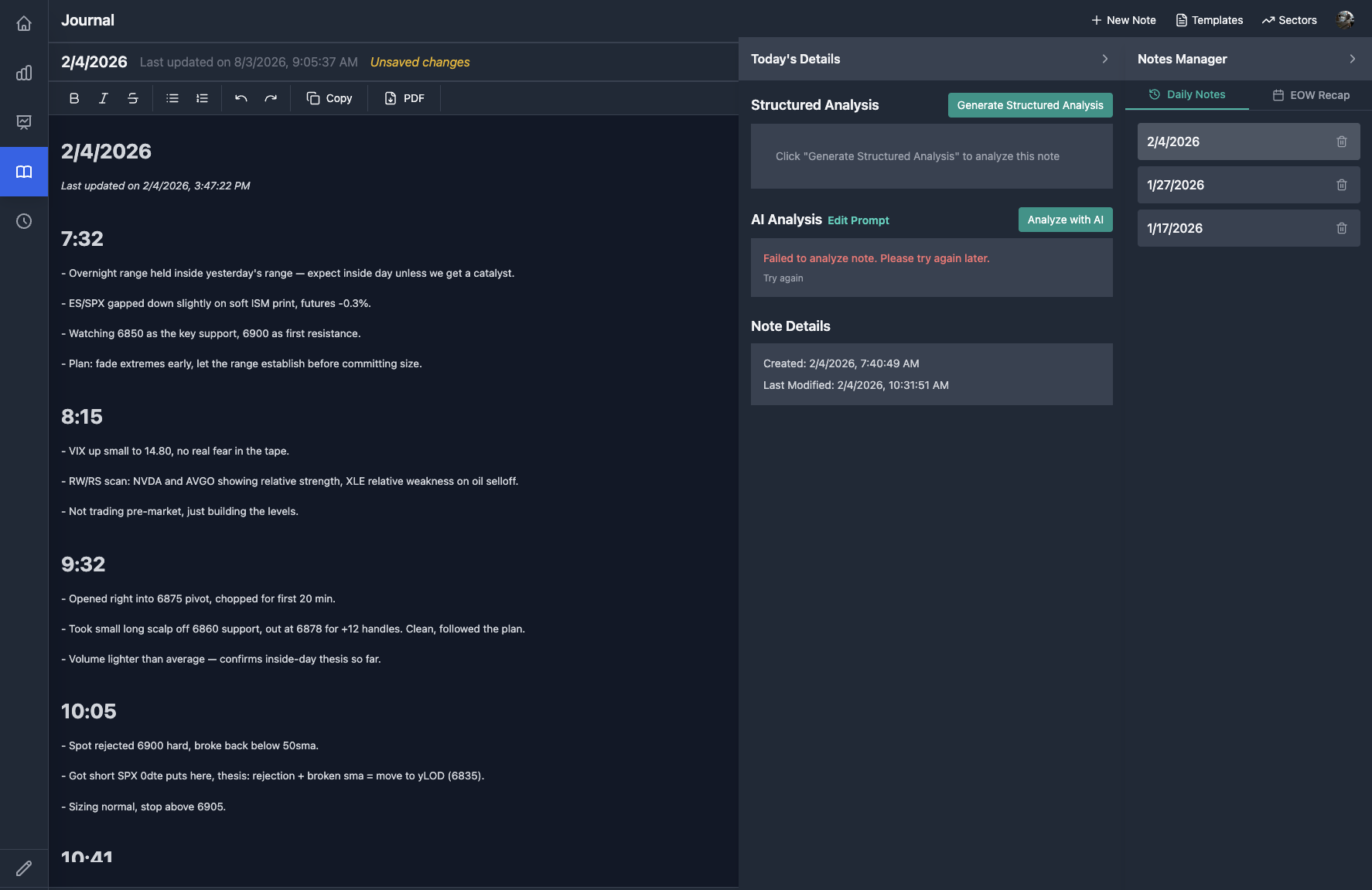
AI-Assisted Trading Journal
A frictionless daily/weekly trading journal with reusable templates and an AI analysis layer, built into a personal trading toolkit.
The Problem
Consistent journaling is one of the highest-leverage habits for tracking market decisions over time, but generic notes apps have no concept of a market day’s structure, and dedicated journaling products are either subscription-gated or don’t let entries feed into my own AI analysis. I wanted frictionless daily and weekly journaling that lived next to my actual market dashboards, with structured, templated entries and an AI layer that could analyze patterns across entries rather than leaving them to sit as unstructured text.
The Solution
A rich-text journaling app built into my personal trading toolkit that supports both quick daily entries — via a modal reachable from anywhere in the app — and structured weekly review notes, backed by reusable templates and prompts so entries follow a consistent format instead of a blank page every time. An AI analysis layer reads entries and produces structured feedback, so journaling doubles as a lightweight coaching loop rather than a private diary that only gets reread.
Outcome & Impact
The journal has been in continuous personal use since early in the toolkit’s development, with 56 commits specifically touching journal-area code as the daily/weekly entry, template, and AI-analysis flows were iterated on. It replaced ad hoc note-taking in a generic notes app with a structured system I use daily, reachable from any screen in my trading toolkit via the global quick-entry modal, with an AI analysis layer giving me structured feedback I never had before.
| Metric | Detail |
|---|---|
| Usage | Daily quick entries plus structured weekly reviews, used continuously since early in development |
| Development volume | 56 commits touching journal-specific code |
| Data model | Entries, templates, prompts, and weekly notes modeled as independent, reusable, related resources |
| Access | Global quick-entry modal reachable from every screen, not just a dedicated journal page |
My Role & Contributions
| Aspect | Detail |
|---|---|
| Role | Sole architect and engineer, solo personal project |
| Team size | 1 |
| Timeline | Built and iterated over the toolkit’s roughly year-and-a-half lifespan; in active daily/weekly use |
| Scope | Rich-text editor integration, quick-entry and weekly-review flows, a template/prompt management system, AI-driven structured analysis of entries, and the full CRUD backend and data model |
| Key decisions | Built a global “quick journal” entry point reachable from any page in the toolkit, not just the journal’s own screen, so logging a note never interrupts whatever dashboard I’m looking at; separated daily entries from weekly structured reviews as distinct flows instead of forcing one format to serve both; made templates and prompts first-class, editable objects rather than hardcoded entry structures |
Technical Overview
[Rich Text Editor] --> [Journal API (CRUD)] --> [Postgres: entries/templates/prompts/weekly notes]
        |                                                |
        +--------------------- entries --> [AI structured analysis] --> [Analysis panel]
The frontend uses a rich-text editor for entry composition, with a custom toolbar and formatting extensions. Entries, weekly notes, templates, and prompts are all first-class, independently addressable resources with their own REST routes and Postgres tables, rather than journaling being a single blob-of-text feature — this is what lets templates be reused across entries and prompts be managed independently of the entries they’re applied to. A “quick journal” modal is wired into the app’s global navigation so an entry can be started from any screen without navigating away from a live dashboard. On submission, entry text is sent to Claude for structured analysis — pattern, sentiment, and discipline-style feedback rendered in a dedicated analysis panel alongside the raw entry, with a separate view that rolls up a week’s entries into one structured weekly analysis.
Data model
Entries, templates, prompts, and weekly notes are modeled as separate related tables rather than embedded JSON blobs, so templates and prompts can be authored, versioned, and reused independently of any single entry.
Challenges & Key Decisions
Making journaling frictionless enough to actually stick to
The single biggest risk to a journaling habit is friction — if logging a note requires leaving whatever I’m looking at, the habit doesn’t survive contact with a busy market day. I solved this by building the quick-entry flow as a global modal rather than a dedicated page, reachable with one click from any dashboard in the toolkit, so capturing a thought never means abandoning the screen I’m actually working from.
Structuring entries without over-constraining them
A rigid form-based entry structure would capture consistent data but kill the freeform, in-the-moment value of journaling; a fully blank text box would be consistent with nothing useful. I resolved this by making templates and prompts optional, reusable, user-editable objects layered on top of a rich-text entry rather than a fixed schema, so an entry can follow a structured weekly-review template or just be freeform notes, and the structure itself can evolve without a code change.
Turning journal entries into feedback, not just an archive
A journal that’s only ever read by going back and rereading old entries doesn’t close the loop on behavior. I added a structured AI analysis pass over individual entries, and a separate rollup pass over a week’s worth of entries, specifically so the journal functions as a lightweight review and coaching mechanism, not just a write-only log.
Lessons Learned
- Friction kills habits before feature gaps do. Making the entry point global — a modal reachable from any screen — drove more consistent use than any feature inside the journal itself.
- Optional structure beats mandatory structure. Making templates and prompts editable, reusable objects rather than a fixed entry schema let the journal support both freeform and structured entries without forcing a tradeoff between the two.
- A journal is more useful as a feedback loop than an archive. Adding AI analysis over entries and weekly rollups turned passive note-taking into something that actively surfaces patterns back to me.
Screenshot
A daily journal entry with timestamped notes throughout the session, alongside the Notes Manager panel for structured AI analysis, note history, and quick navigation between recent entries.