CalPal: Learning iOS by Building an AI Nutrition Tracker
A self-imposed crash course in native iOS: build a working SwiftUI/SwiftData app from zero, using a multimodal meal-logging tool as the vehicle rather than the goal.
The Problem
I’d never built a native iOS app before, and reading about SwiftUI is a poor substitute for actually shipping something to a device. The goal wasn’t the app itself — it was forcing myself through the real friction points of iOS development that don’t show up in tutorials: local persistence with SwiftData, Keychain-backed secret storage, device signing and provisioning, camera/photo-library permissions, and SwiftUI’s animation system, all in a single sitting rather than spread across disconnected exercises.
I picked a nutrition tracker as the vehicle because it has a natural progression of hard-enough problems: a data model with real relationships, an external AI dependency for the actual value-add (turning a photo or text description into structured macros), and a UI ambitious enough to be worth the fight (an expandable dashboard with scrubbable charts) without being an open-ended design project.
The Solution
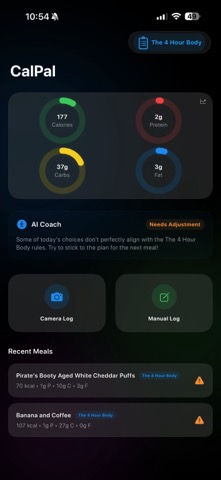
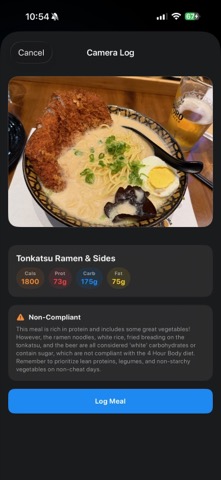
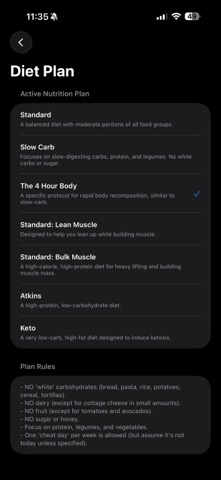
CalPal logs meals two ways — typed description or a meal photo — and sends either to Gemini 2.5 Flash with a system prompt that asks for strict JSON back: estimated calories/protein/carbs/fat, a compliance verdict, and a short coaching message. The compliance check is evaluated against whichever of 7 diet philosophies (Standard, Slow-Carb, Keto, Atkins, and others) the user has active, each with its own bulleted rule set baked into the prompt rather than hardcoded parsing logic. Everything is stored locally with SwiftData — no backend. The home screen shows daily macro rings that expand, on tap, into a scrubbable time-series chart (day/week/month) with haptic feedback as you drag across data points.
Outcome & Impact
A working local-first iOS app: two independent meal-logging paths (manual text, photo-library image) both round-tripping through Gemini into a persisted MealLog, a 7-plan compliance engine, and an animated dashboard with real chart-scrubbing interaction — running on a physical iPhone, not just the Simulator. As a learning exercise, it did what it was supposed to: forced hands-on time with SwiftData persistence and schema-evolution handling, Keychain-based secret storage, multimodal API integration, device signing, and SwiftUI’s animation/gesture system, all inside one short build window.
| Metric | Detail |
|---|---|
| Build timeline | 2 days, 14 commits |
| Phases completed | 6 of 7 planned (local data, AI text-to-macros, diet-plan engine, dashboard visuals, device deployment, camera/vision) |
| Phases deferred | Cloud sync & backend (Supabase auth, RLS, signed URLs) — scoped but not started |
| Known open bug | Direct camera capture button is an unwired stub; photo-library picking works |
| Diet plans modeled | 7 (Standard, Slow-Carb, 4-Hour Body, two muscle-focused variants, Atkins, Keto) |
My Role & Contributions
| Aspect | Detail |
|---|---|
| Role | Sole developer, first native iOS project |
| Team size | 1 |
| Timeline | 2 days (Mar 1–2), 14 commits, ~6 of 7 planned phases |
| Scope | Data model, Gemini integration, diet-plan rule engine, camera/photo-library flow, animated dashboard with chart scrubbing, Keychain secret storage, on-device signing |
| Key decisions | Diet rules encoded as prompt text rather than a rules engine; API key kept exclusively in Keychain, never in the SwiftData store; local-first with cloud sync deliberately deferred to its own phase |
Technical Overview
[Text or Photo Input] → [GeminiService: multimodal prompt] → [Structured JSON: macros + compliance + feedback]
                                                                        │
                                                                        ▼
                                                          [SwiftData: MealLog, @Attribute(.externalStorage) for images]
                                                                        │
                                                                        ▼
                                                [HomeDashboardView: rings ⇄ ChartContainerView (Area/Line + scrubbing)]
GeminiService builds a single multimodal request — system prompt plus optional text and/or base64 image data — and forces response_mime_type: application/json so the model’s reply decodes directly into a MealResponse struct, with no markdown-fencing cleanup needed. PlanType is a 7-case enum where each case supplies its own complianceRules string; adding an 8th diet means writing one new case, not touching the network or parsing code.
MealLog is a SwiftData @Model with @Attribute(.externalStorage) on the image blob (keeps large photo data out of the main store) and a private/public property pair (internalPlanType / planType) that defaults old rows to .standard if the schema gains cases later, so existing local data doesn’t crash on load. SecretManager wraps the Keychain APIs directly (kSecClassGenericPassword) rather than pulling in a wrapper library, keeping the Gemini API key off the device’s SQLite store entirely.
The dashboard (HomeDashboardView + ChartContainerView + TimeframePicker) uses matchedGeometryEffect to morph the same ring views between a 2×2 grid (compact) and a horizontal strip (expanded, with a chart below), and a chartScrubbing view modifier drives a drag gesture that live-updates the ring values to whatever point in the timeframe the user’s finger is over.
Challenges & Key Decisions
Turning “call an LLM” into a real data contract
The easy version of this integration returns free text and regex-parses it. Instead, the prompt spells out an exact JSON shape and Gemini’s response_mime_type: application/json config is used to enforce it structurally, so MealResponse: Codable can decode the response with no defensive string-cleanup step. The tradeoff is that a malformed or refused response has no graceful partial-parse path — it’s a hard GeminiError.parsingError — which was an acceptable simplicity/robustness tradeoff for a single-user local app but wouldn’t survive as-is with real users.
Encoding subjective diet rules as prompt text, not app logic
Seven diet philosophies (keto, slow-carb, Atkins, muscle-gain variants) each have their own compliance rules, and none of them reduce to clean arithmetic — “no white carbs,” “one cheat day per week,” “70-80% of calories from fat” are judgment calls, not thresholds a Swift if statement can check reliably. Rather than building a mini rules-engine, each PlanType case owns a complianceRules string that becomes part of the system prompt, delegating the actual judgment to the model. That keeps adding a new diet cheap (one new enum case, no code changes to the request pipeline) at the cost of the compliance verdict being only as consistent as the model’s interpretation of the rule text.
Hitting the real wall of device deployment
Getting camera access working on a physical iPhone meant working through Info.plist usage descriptions, Xcode automatic signing with a personal Apple ID, and the “trust this developer” step in iOS Settings — none of which show up in SwiftUI tutorials that only target the Simulator. That whole sequence is written up step by step in the project’s own implementation plan, specifically because it was the part most likely to be forgotten before the next iOS project.
Where the two days ran out
The backlog is honest about what didn’t get finished: the “Take Photo” button in CameraEntryView is a stub (the action closure is empty — photo-library picking works, direct camera capture doesn’t), and Phase 7 (Supabase auth, Row-Level Security, cloud photo storage with signed URLs) was scoped in the implementation plan but never started. Both were deliberately left as the next-session’s problem rather than rushed to closure inside the two-day window.
Tech Stack
| Layer | Technologies |
|---|---|
| UI | SwiftUI (SwiftData @Query, matchedGeometryEffect, custom chart scrubbing) |
| Persistence | SwiftData, with @Attribute(.externalStorage) for image blobs |
| Secrets | iOS Keychain (Security framework, no third-party wrapper) |
| AI | Google Gemini 2.5 Flash (multimodal: text + inline image data), JSON-mode responses |
| Deployment | Xcode automatic signing, physical-device testing |
Lessons Learned
- A learning project still needs a real forcing function. Picking a problem domain (nutrition) with a genuine external dependency (an AI API) and a genuine hard UI problem (scrubbable charts) produced far more useful friction than a to-do-list app would have — the goal was hitting real iOS rough edges, not avoiding them.
- Structural JSON enforcement beats prompt-and-hope parsing. Using the API’s own JSON response mode instead of asking nicely for clean output removed an entire category of “the model added a code fence” bugs before they could happen.
- Delegating judgment calls to the model, not the codebase, is a legitimate scope decision — with a legible cost. Encoding diet compliance as prompt text rather than a rules engine made 7 diets cheap to support, but it also means the app’s own answer is only as reliable as the model’s read of the rule text, which is a tradeoff worth naming rather than hiding.
- Device deployment friction is worth documenting the first time, not just surviving it. Writing the signing/trust/permissions steps into the project’s own plan file turned a one-time struggle into a reusable checklist for the next iOS project.